Writing RAG Without the Vector DB Headache? Try Gemini API File Processing
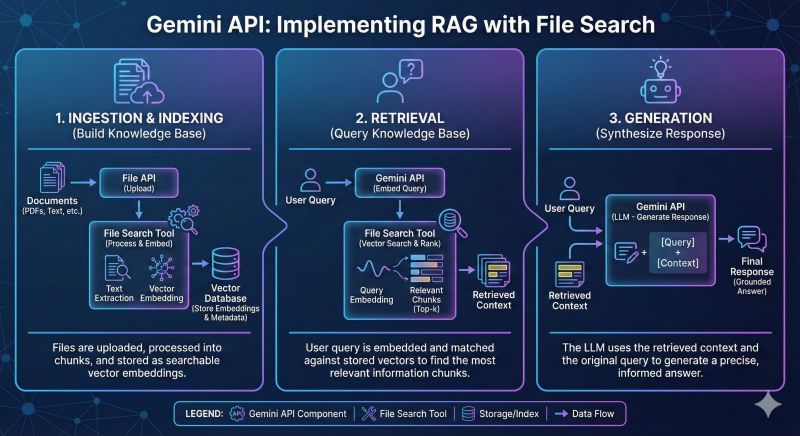
I recently tried the File Search / Document Processing feature of the Gemini API, and it really saves a lot of effort.
Writing RAG used to mean going through: ❌ Parsing PDF/Docs ❌ Chunking (splitting the text) ❌ Generating Embeddings and storing them in a Vector Database ❌ Writing the logic for Semantic Search
Now, with the Gemini API’s File capability and its huge Context Window (even Flash has 1M tokens), the whole flow is much simpler.
A few observations:\
- Extremely fast development: a few lines of code and you’re done, with no extra database to maintain.\
- Strong understanding: because the model reads the full text (Full context), it’s less likely to take things out of context than traditional RAG, which only pulls out a few pieces of text (Chunks).\
- Cost-effective: for small and medium projects, it’s cheaper than keeping a Vector DB running.
If you’re still struggling to build a quick demo for a client, I highly recommend trying this route! 🚀
💻 Code Example:
# 1. Upload File
doc = genai.upload_file(“spec.pdf”)
# 2. Init Model (Flash 1.5)
model = genai.GenerativeModel(“gemini-1.5-flash”)
# 3. Ask with Context (Native RAG)
response = model.generate_content([doc, “Summarize the key points.”])
print(response.text)